mealkit
Preparing a Delicious Dish of Compliance from a Chef “Meal Kit”
You can also find this published as a Github Page
Description
Chef’s Premium Content is delivered fresh to you with only the finest ingredients of code. Utilizing that premium audit and remediation content (as I like to call it “meal kit”), I will teach you how to create a wrapper of compliance to deliver to your systems to ensure persistence and validation. Utilizing this method will get you from sous to head chef in the shortest time possible.
In this 90 Minute Workshop, we are going to create a wrapper cookbook with the premium STIG (Security Technical Implementation Guides), understand and implement waivers, use the Chef Infra remediation wrapper with exceptions, and deliver the content to a provided Ubuntu 20_04 server.
Prerequisites
For this Workshop to participate and follow along, you will need:
- Your laptop with Chef Workstation installed
- You should know how to configure your local credentials file and be able to knife to a new server / org.
- A personal GitHub account
- A basic knowledge of Chef and policyfiles.
- 7zip or the like for Windows to un-tar files
What we are doing in this Workshop
The idea of this workshop came from the work I did to create a new and updated Chef DEMO for Solution Architects to present to potential customers and existing customer base. What we are going to do is build three cookbook, one base cookbook, one compliance cookbook that holds just the STIG compliance profile(s) and one (really two) that contain the remediation content (and the wrapper for attributes to indicate which to apply or not apply.)
Other things we are going to learn in this workshop are:
- Integrating Compliance Profiles into cookbooks and use the Compliance Phase. This eliminates the need to have profiles stored in other places and use tokens to access those.
- Looking at output in Automate - Infrastructure and Compliance
Due to time constraints, we are only going to use the Ubuntu 20.04 content, but adding additional content and guarding for different platforms is relatively easy and repeatable.
What you should know at the end of this workshop
- How to create a base cookbook with the Chef Client configuration.
- Taking a Compliance Profile and creating a cookbook for it to be used with Compliance Phase.
- Creating a Waiver file and push it out with a cookbook.
- Enable / Disable features of our Premium Remediation content.
- Utilizing policyfiles, apply the same cookbooks but trigger functions with an attribute.
We are going to run our cookbook in three modes, client only (or base), audit only, and enforcement mode.
Some information about Chef Premium Content (Disclaimer)
NOTE: We are using and sharing Progress Chef proprietary content. This is for educational purposes only. Please do not use or share this content without proper authority. Please check with your Account Exec to verify that you are entitled to the Chef Premium Content. Typically it is sold with Chef InSpec as a part of our Compliance Automate SKU.
My Setup
- Using my standard Azure demo build out, run the Terraform plan with 18 (2 x 9) Ubuntu 20.04 workstations. These will automatically be bootstrapped to the IT_DEVOPS org.
- Automate Server
- Create 8 orgs for 8 attendees. Make up fun names.
- Create a user for each of those orgs
- Store the PEM key to be shared with each attendee.
- Suggest to put all of this into the github repo that will be used for sharing the content.
- Re-bootstrap 18 nodes, 2 each, to those 9 orgs
- They should have workstation installed and ready to edit their credentials file to connect to the lab environment
- I got fancy and created Automate Users and Projects. We will at least use Filters to view our own systems.
It’s Go Time
Clone the base Mealkit cookbook from the Snohio org on github.
- Clone the full chef-repo with the framework needed at https://github.com/snohio/mealkit/ to your laptop.
- Do this with
git clone https://github.com/snohio/mealkit.gitfrom your~/home path. - Open this repo with VS Code (or another editor if you don’t have VS Code)
Setup Local Knife for this workshop
Setup your local KNIFE access with the information on the Assignments page.
- Update your credentials file. Add a new profile called
mealkit. - It will look something like:
# tandori
[tandori]
client_name = "tandori"
client_key = "~/mealkit/nothingtoseehere/tandori.pem"
chef_server_url = "https://mealkit.azure.chef-demo.com/organizations/tandori"
cookbook_path = ['~/mealkit/cookbooks']
All of the credentials are in
~/mealkit/nothingtoseehere/credentials. You can rename your existing file and put this in that same folder. On MacOS/Linux it is in~/.chef/and Windows in~\AppData\Local\chef\.chef\.
Set your default profile to that profile (meal name). $env:CHEF_PROFILE = "tandori" for example.
- To test, run
knife client listand you should see twonode-linux-##nodes and the validator.
PAUSE HERE FOR TROUBLESHOOTING
Log into Automate to look around for a minute
- Log on to the Mealkit Automate instance.
- Use your
meal nameas the user andCod3Can!as the password. - We are using Projects, Policies and roles (not to be confused with Roles and Policyfiles in Chef Infra).
- Check out Infrastructure tab. You should see two linux nodes (NODE-LINUX-XX). You’ll want to note these.
- Let’s check out the Chef Infra Servers space. You’ll see the Mealkit server and then your own org.
- Clients & Nodes should show you only your nodes also. This is because these are tied to Projects.
Looking at the base cookbook
- Let’s take a look at the cookbook named base.
- Open the default.rb file.
- Look at the base policyfile and at the attribute
default['mealkit']['mode'] = 'client' - This will trigger the chef_client recipe in the base cookbook. Let’s take a look at that.
Apply the base to your two nodes
- cd to your
~/mealkit/policiesfolder and runchef install base.rb. This will create the base.lock.json - Push the policy to your Chef Org with
chef push dev base.lock.json - Let’s go ahead and assign your two nodes with
knife node policy set node-linux-xx dev base - Nodes are checking in every 5 minutes so we might have a few minute wait here for questions.
Review in Automate
- Look at the Infrastructure tab. You should see your two nodes that are now in the dev policygroup.
- Open one and check that the cookbook is running correctly.
- Go to the Compliance tab and you should see your Base profile and nodes passing successfully.
Download the Compliance Profile from Automate
- Since we are in Compliance select Profiles and Available
- Search for
Ubuntu 20.04 - Click on Canonical Ubuntu 20.04 LTS Security Technical Implementation Guide CAT I Only
- Click Download
-
Open the file and we’ll walk through the rest. basically here we are going to put the contents into the
~/mealkit/cookbooks/benchmarks/compliance/profiles/folder. - Update the base::default.rb - uncomment the bits for the
elsif node['mealkit']['mode'] == 'audit' - Let’s talk about those lines.
Review audit.rb recipe
- Review the audit.rb recipe
- Look at the waiver file - what are we waiving and why.
- There is a lot more we can do with waivers, like merge an existing file with what is in this file folder.
- Update the metadata.rb file and uncomment
# depends 'benchmarks'
Policyfile time
- Review the policyfile
./mealkit/policies/audit.rb - We are triggering with the mode being audit now.
- Run
chef install audit.rbfrom~/mealkit/policies. This will create the audit.lock.json - Push the policy to your Chef Org with
chef push dev audit.lock.json - Let’s go ahead and assign your first node with
knife node policy set node-linux-xx dev audit
Check it out in Automate
- Again, let’s jump onto Automate
- Check the Compliance and let’s see how many checks we fail.
Download and apply the Premium Content
Premium Content is shared on mostly monthly basis to customers who have subscribed, via email with links to download as in the example below:
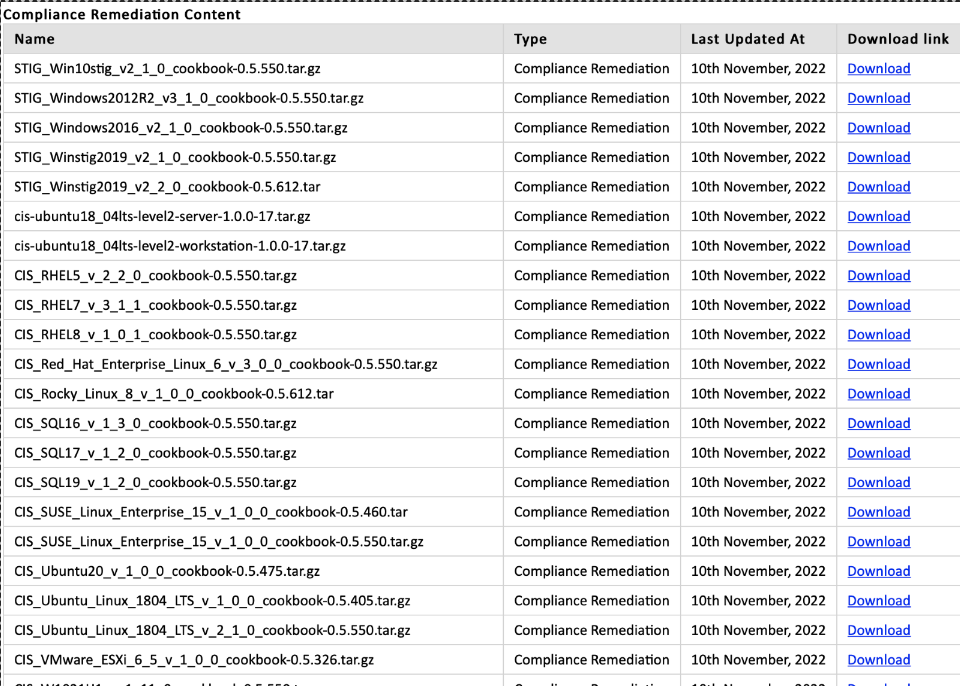
This is covered in the Chef Blog Post How to Setup Seamless Premium Content Delivery for Compliance Audits & Remediation
- Download the Premium Content from here. This is a temporary download space. You will want to download your content from the email that you get
- Untar these and put them directly in the
~/mealkit/cookbooks/folder
We are going to review the
remediation_stig_ubuntu2004_v1_2_0_wrapper\attributes\default.rbfile and look at what is"enabled": "false"
- On our base cookbook default.rb let’s uncomment the last section with regards to enforce mode.
- Notice that we are calling all three recipes. That is what makes this base cookbook a “wrapper”. While, yes, all of the recipes that we are calling are all within this one cookbook, they don’t have to be
- Review the enforce.rb recipe
- There is really not a lot here, we are just calling the wrapper which is setting attributes and then calling the actual cookbook.
- Update the metadata.rb file and uncomment
# depends 'remediation_stig_ubuntu2004_v1_2_0_wrapper'- Look at the metadata.rb file of
remediation_stig_ubuntu2004_v1_2_0_wrapperyou’ll see it# depends 'remediation_stig_ubuntu2004_v1_2_0'
- Look at the metadata.rb file of
Last Policyfile
- Review the policyfile
./mealkit/policies/enforce.rb - We are triggering with the mode being audit now.
- Run
chef install enforce.rbfrom~/mealkit/policies. This will create the audit.lock.json - Push the policy to your Chef Org with
chef push dev enforce.lock.json - Let’s go ahead and assign your second node with
knife node policy set node-linux-xx dev enforce - This is going to show us the difference between running audit and enforce.
Automate Infra stuff
- Jump over to Automate
- Look at the Infra tab and check out your second node.
- Sometimes the Ubuntu remediation takes a time or two to run. It is setting some audit properties of files that may be locked.
- Pop on over to the Compliance tab and lets compare
Question time
- Let’s do a quick review of what all we learned. Let’s go around the room for that. What did you learn?
- That pretty much takes us to the end of the workshop, but I know there are going to be tons of questions.

That’s a Wrap
- You can find me on Chef Community Slack first and foremost.
- Also some LinkedIn and Twitter and weblinks at LinqApp